MSME Verification: How to Verify Your Udyam Registration Certificate Online





The Micro, Small and Medium Enterprise (MSME) sector in India contributes over 30% to the GDP of the country and employs more than 32 crore people. Yet many registered enterprises overlook a simple but consequential step: verifying that their Udyam Registration Certificate is accurate, active and up to date.
MSME verification matters for two distinct reasons. The first is practical: ensuring that your Udyam profile is correct, so it works reliably when you need it for vendor onboarding, government tenders or scheme applications. The second is financial: understanding exactly what a lender sees when they independently check your Udyam profile during a Business Loan application and what discrepancies in that profile can cost you in terms of processing delays or conditions.
What is MSME Verification?
MSME verification is the process of cross-checking a Udyam Registration Number (URN) of the business against the official Udyam database to confirm that the enterprise is genuinely registered, correctly classified and that key fields, enterprise name, PAN linkage, address and MSME category are accurate and current.
The Udyam certificate functions as a digital identity document for Micro, Small, and Medium Enterprises. It is issued by the Ministry of MSME upon successful registration at udyamregistration.gov.in and carries a unique URN, a QR code and the current classification of the enterprise. The certificate is valid for the lifetime of the enterprise with no fixed expiry date but must be updated annually and whenever material information changes.
Why MSME Verification Matters: Five Areas Where It Makes a Measurable Difference
A verified and updated profile does not just support compliance; it directly impacts how smoothly your business interacts with financial institutions, buyers and government systems.
| Area | How a Verified and Updated Certificate Helps | Risk If Profile Is Outdated or Inaccurate |
| Business Loan eligibility | Lenders cross-check URN, PAN and GST data as part of credit assessment. A verified and updated profile reduces documentation queries and speeds up disbursement. | A profile mismatch triggers additional verification, adds processing time and may require the applicant to submit corrected documents before the file progresses. |
| Government scheme access | Subsidies, interest subvention programmes and CGTMSE credit guarantee cover require an active and correctly classified MSME registration. | An outdated classification where turnover or investment has grown beyond the registered category can disqualify you from scheme benefits you are otherwise entitled to. |
| Procurement and tenders | Government portals and large corporate buyers verify URN before onboarding vendors or releasing MSME-specific payment preferences and bid exemptions. | An incorrect or unverifiable profile results in rejection at the vendor onboarding stage or loss of tender preference for registered MSMEs. |
| Faster buyer payments | Buyers who confirm MSME status can activate priority payment cycles and fee waivers available under the MSMED Act, 2006. | Without a verifiable MSME status, standard payment terms typically apply, 60–90 days rather than the 45-day maximum mandated for MSME suppliers. |
| Fraud prevention | Financial institutions and buyers can detect impersonation or incorrect classification before funds are committed. | Errors in your own profile can be misread as inconsistencies during due diligence, even if you had no intent to misrepresent. |
Also Read - MSME Loan Subsidy: Complete Guide for Businesses
How to Verify Your Udyam Registration Certificate Online
The verification process takes only a few minutes on the official Udyam portal and requires no login for a basic check. You will need your Udyam Registration Number (URN), which is printed on your certificate and begins with UDYAM followed by the state code and a unique identifier.
Before you start: Have your URN ready. Copy it directly from your certificate PDF to avoid transcription errors; even one character difference will return no result.
- Visit the official Udyam portal at udyamregistration.gov.in in a secure browser session.
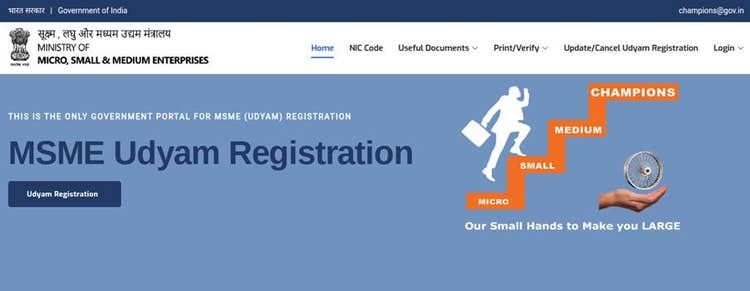
- Navigate to the verification section, typically labelled Verify Udyam Registration or similar.
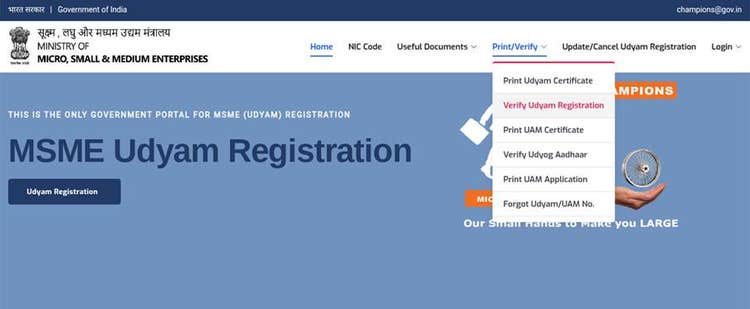
- Enter your URN exactly as shown on your certificate, without spaces or additional characters.
- Complete the on-screen captcha and submit to retrieve the registered enterprise record.
- Review the displayed profile: enterprise name, address, MSME classification, PAN linkage and date of registration.
- Compare each field against your own business documents. Note any discrepancies.
- If any field is outdated or incorrect, log in to the Udyam portal to update it, then repeat verification to confirm the revision is now live.
Note: Third parties, financial institutions, government agencies and corporate buyers follow this same process using the URN you provide to them. The information they see is only as reliable as the data you have maintained on the portal. A financial institution that finds a mismatch during its independent check has no way to know whether it is an error or an inconsistency; both are treated with the same caution.
Common MSME Verification Errors and How to Fix Them
Understanding common errors can help you avoid delays and fix verification issues quickly, keeping your business records accurate and reliable.
| Error | Likely Cause | Resolution |
| No record found for URN | URN entered with spaces, incorrect characters or a copy-paste formatting error | Copy the URN directly from the certificate PDF and retry to avoid manual re-typing |
| Details do not match your documents | Profile not updated after a change in address, category, business name or constitution | Log in to the Udyam portal, update the relevant field and reverify once the change is processed |
| PAN or GST mismatch in verification | Enterprise name or constitution differs across GST, PAN and Udyam databases | Align your Udyam profile with your PAN and GST registration before submitting the correction all three must be consistent |
| Portal not responding | Server maintenance or peak traffic period | Retry during off-peak hours or on a different network connection official portal availability issues are typically resolved within a few hours |
| OTP not received for profile edit | Registered mobile or email is inactive or belongs to a previous owner or contact | Update contact details on the Udyam portal through the available account recovery process before OTP-based actions will work |
What Godrej Finance Checks in Your Udyam Profile During Business Loan Processing
When a business applies for a Business Loan solution from Godrej Finance, our credit assessment team runs an independent check on the URN provided in the application. This is not a formality; the results of this check directly affect processing speed and, in some cases, the loan amount and terms offered. Here is specifically what we review:
| What We Check | Why It Matters | What Causes a Query or Delay |
| URN is valid and the enterprise is genuinely registered | Confirms the business is an active Udyam-registered enterprise, not a false claim of MSME status | An invalid or unverifiable URN is a serious flag the application cannot proceed under MSME lending terms until registration is confirmed |
| MSME classification matches declared turnover | We cross-reference the classification (Micro, Small or Medium) with the turnover and investment figures declared in the application and GST returns | A classification that appears inconsistent with turnover, for example, a business still classified as Micro despite GST filings showing significantly higher turnover, can trigger scrutiny. |
| Enterprise name and PAN consistency | The name and PAN in the Udyam profile must match the same fields in the loan application, GST returns and bank statements | Even a minor spelling variation between the Udyam profile and PAN records is treated as a document mismatch requiring resolution before the file can proceed |
| Address is current and matches KYC | Registered address in Udyam profile must align with the address in the loan application and KYC documents | Stale or incorrect addresses create a verification gap that requires explanation and supporting documentation to resolve |
| Annual update compliance | The Ministry of MSME requires annual updates with ITR and GST data. We check whether the profile reflects current year data | Profiles that have not been updated for 2 or more years raise questions about whether the enterprise is actively managed this can affect the credit risk assessment |
Pre-application checklist for Business Loan applicants:
- Verify your URN is active on the Udyam portal and do this the day before your application, not weeks earlier
- Confirm your enterprise name, PAN and address in Udyam match your other documents exactly
- Complete your annual update if it is overdue. This is required for all enterprises under the Ministry of MSME guidelines
- Ensure your registered mobile and email on the Udyam portal are active, as these are needed for OTP-based actions
- Use the Business Loan EMI Calculator to estimate your repayment before you apply
Also Read: Everything you need to know about Business Loan – A definitive guide
Keeping Your Udyam Certificate Updated
The Udyam registration is valid for the lifetime of the enterprise. However, the Ministry of MSME requires enterprises to update their profile annually based on the ITR of the previous year and GST data and whenever material information changes during the year.
Situations that require an update:
- Change in registered address or communication details
- Change in business constitution from proprietorship to partnership or private limited structure
- Addition or change in primary business activity or NIC code
- Change in investment in plant and machinery or annual turnover that affects your MSME classification
- Change in bank account or key contact details linked to the enterprise
After each update, re-run the verification check to confirm the revised details are live and visible to third parties. This is particularly important before submitting a loan application or responding to a government tender.
Final Thoughts
Your Udyam Registration Certificate is the most accessible business credential you carry. It is free to obtain, takes minutes to verify and opens doors to institutional credit, government schemes and procurement opportunities that are otherwise unavailable to unregistered enterprises.
The benefit of keeping it accurate and up to date compounds over time. Each interaction, a loan application, a vendor onboarding, a tender response, processes faster and with less friction when your Udyam profile is clean and consistent across all formal channels.
Apply Now for a Business Loan
FAQs
Q.1. What is MSME verification and why is it needed?
A. MSME verification is the process of confirming that a Udyam Registration Number (URN) of the business is valid and that the associated enterprise details are accurate in the official Udyam database. It is used by lenders, government agencies, corporate buyers and vendors to confirm the legitimacy and current classification of an enterprise before extending credit, scheme benefits or procurement opportunities. Verification takes minutes on the official Udyam portal at udyamregistration.gov.in and requires only the URN and a captcha; no login is needed for a basic check.
Q.2. How does MSME verification affect a Business Loan application?
A. When you apply for a Business Loan, lenders independently verify your URN against the Udyam database as part of their credit assessment. They check that the URN is valid, that your MSME classification is consistent with your declared turnover, and that your enterprise name and PAN match your other submitted documents exactly. A verified, updated and internally consistent Udyam profile reduces documentation queries and supports faster credit decisions. A mismatch or an outdated profile, particularly one with an incorrect classification or a stale address, can trigger additional verification requirements and delay disbursement.
Q.3. Can a lender verify my Udyam certificate without involving me?
A. Any third party with your URN can perform a verification check on the official Udyam portal. Lenders, government agencies and corporate buyers do this routinely using the URN provided in your application or vendor registration. The check displays publicly available enterprise name of the field, addresses, classifications and registration date without exposing sensitive private data. This is why maintaining an accurate profile is important: a lender who finds an inconsistency during their independent check cannot distinguish between an error and an intentional misrepresentation, and both are handled with the same level of scrutiny.
Q.4. How long is an Udyam certificate valid?
A. The Udyam registration is valid for the lifetime of the enterprise; there is no fixed expiry date. However, enterprises are required to update their profile annually with the income of the previous financial year and GST data and whenever material information changes during the year. An outdated profile can cause verification failures even if the registration is technically active. A profile that has not been updated for two or more years will often raise questions during lender due diligence.
Q.5. Is there a fee to verify or update an Udyam certificate?
A. Verification is completely free on the official government portal at udyamregistration.gov.in. Standard profile updates do not attract any government fee. Use only the official portal for all verification and update actions. Third-party consultancy services that charge a fee for assisted Udyam support are private commercial arrangements and are not a government requirement. All actions can be completed directly on the official portal without any fee.
Related MSME Articles
Disclaimer:
The content presented on this page, including images and factual information, is intended solely as a summary derived from publicly available sources. GHFL/GFL (“Company”) does not claim ownership of such information, nor does it represent that the Companies have exclusive knowledge of the same. While efforts are made to ensure accuracy, there may be inadvertent errors, omissions, or delays in updating the content. Users are strongly encouraged to independently verify all information and seek expert advice where necessary. Any decisions made based on this content are solely at the discretion and responsibility of the user. Godrej Capital and its affiliates assume no responsibility for any loss or damage that may result from the use of or reliance on the information provided herein.
Connect with Our Customer Support Team
Customer Support


